Hardware Overview: FOC Motor Controller
Welcome to the official VDriveMotion Hardware Wiki. This documentation provides comprehensive pinouts, electrical characteristics, wiring schematics, and configuration instructions for the VDriveMotion High-Performance Sensorless FOC (Field Oriented Control) Motor Controller.
The VDriveMotion controller is engineered for applications demanding high torque density, precision dynamics, and space-constrained integration, such as quadrupeds, robotic arms, aerospace actuators, and automated guided vehicles (AGVs).
Key Features
- Sensorless Operation: Tracks rotor position down to 0.0 RPM via pulsating D-axis HFI saliency tracking.
- Integrated Measurement: 3-Phase low-side shunt resistor array with hardware CORDIC and Dynamic Over-Sampling in CCMRAM.
- Compact Thermal Layout: Direct thermal-via coupling to an aluminum heat plate for optimal dissipation up to 60.0A RMS continuous.
- Deterministic Communication: Binary COBS wire protocol with CRC16/CRC8 over native USB CDC and CAN-FD.
- Zero-Install Web Tuning: Full motor identification and dead-time LUT calibration in under 60 seconds via WebSerial.
System Architecture
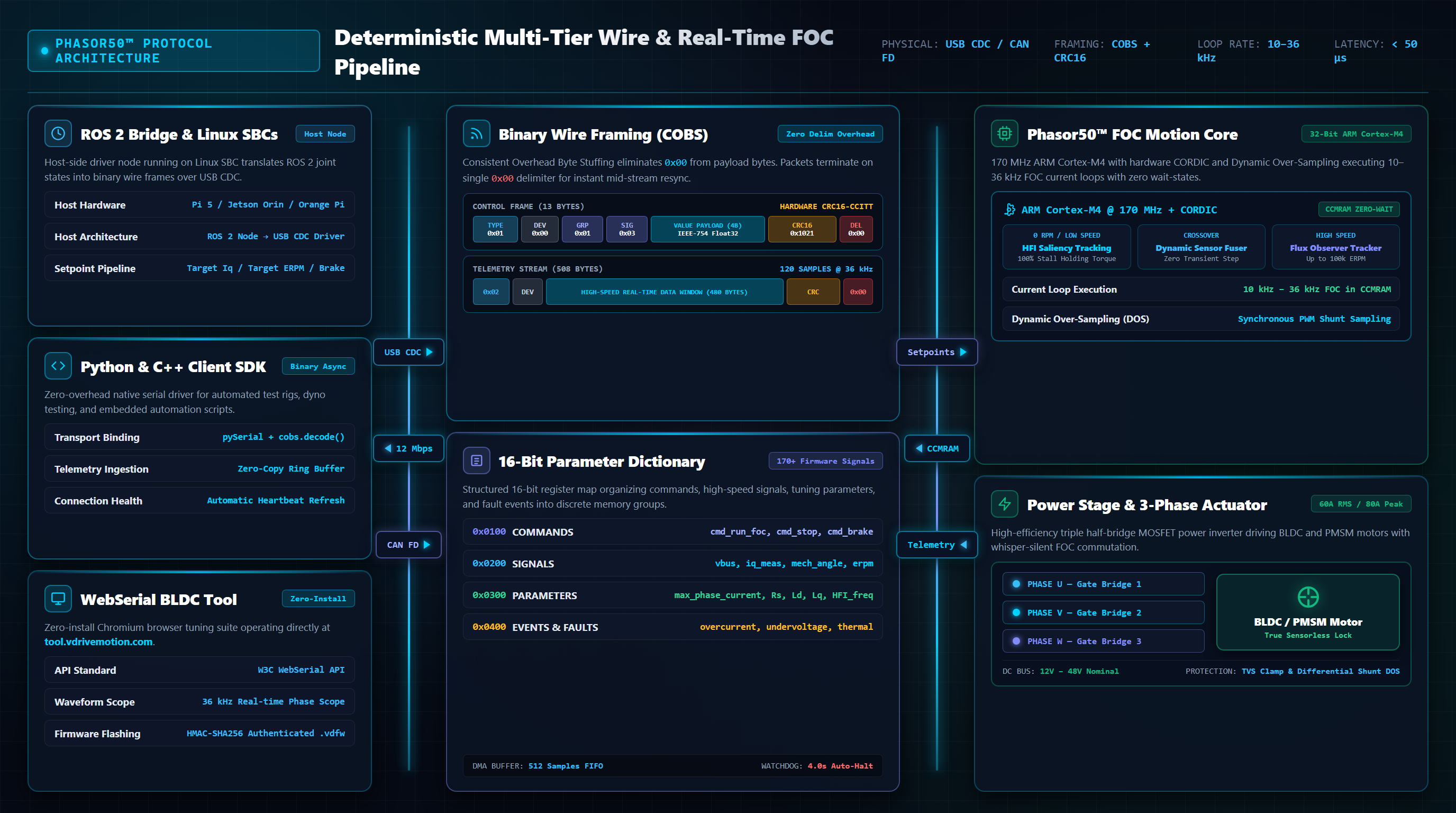
The block diagram below illustrates the layered system integration topology of the VDriveMotion FOC Motor Controller, including interfaces for host communication, dictionary mapping, real-time motion core, and power stage.
Electrical Specs: 70V / 60A FOC Driver
Ensure that all operating variables remain within the absolute maximum bounds listed below. Exceeding these specifications can result in permanent damage to the onboard power stage (MOSFETs, gate drivers) and logic controllers.
| Parameter | Minimum | Typical | Maximum | Unit |
|---|---|---|---|---|
| Operating Bus Voltage | 12 | 48 | 70 | V DC |
| Continuous Phase Current | - | - | 60.0 | A RMS |
| Peak Phase Current Safety Limit | - | - | 80.0 | A Peak |
| Logic Output (3.3V Rail) | 3.2 | 3.3 | 3.4 | V |
| PWM / SVM Switching Frequency | 24.0 | 36.0 | 36.0 | kHz |
| Maximum Velocity (Observer Ceiling) | - | - | 100,000 | ERPM |
| Standby Quiescent Current | - | 15 | 25 | µA |
| Internal Driver Thermal Cutoff | - | 140 | 160 | °C |
High-Precision Current Oversampling
The Phasor50 utilizes a hardware-synchronized multi-sample ADC oversampling pipeline to eliminate switching noise and maximize Field-Oriented Control (FOC) torque precision:
- Midpoint Noise Rejection: Current measurements are triggered synchronously at the exact center of each PWM cycle when switching noise is lowest, delivering whisper-quiet operation and vibration-free motion.
- Adaptive Symmetrical Sampling: The controller automatically captures and averages up to 17 samples per PWM half-cycle, dynamically adjusting the sampling window to maintain clean, distortion-free current feedback across all speeds and duty cycles.
- Sub-Milliamp Precision (16x Resolution): Oversampled measurements are accumulated with 16x scaling, preserving ultra-fine current resolution for exceptional low-speed position hold and delicate torque control.
Connectors & Pinouts
The controller exposes interfaces for power, phases, communication, and auxiliary peripherals. Below are the physical layouts and pin mappings for the primary ports.
1. Main Power & Motor Terminals
| Terminal | Label | Description | Connection Type |
|---|---|---|---|
| V+ (VIN) | Power Input | Positive supply voltage input (12V - 70V DC) | Solder Pad / XT60 Male |
| GND | Power Ground | Negative supply ground | Solder Pad / XT60 Male |
| Phase U | U | Motor Phase U Output | Solder Pad / 4.0mm Bullet |
| Phase V | V | Motor Phase V Output | Solder Pad / 4.0mm Bullet |
| Phase W | W | Motor Phase W Output | Solder Pad / 4.0mm Bullet |
2. Control Port (8-Pin JST-GH)
This connector houses the primary communication protocols (CAN-FD, UART) used to interface with a master controller (such as a Raspberry Pi, Jetson Nano, or microcontroller board).
| Pin | Pin Name | Direction | Description | Logic Level |
|---|---|---|---|---|
| 1 | GND | Power | Signal Ground reference | 0V |
| 2 | +5V | Power Out | 5V supply out (for receiver or master controller) | 5V (1A Max) |
| 3 | CAN_H | I/O | CAN Bus High terminal | CAN Standard |
| 4 | CAN_L | I/O | CAN Bus Low terminal | CAN Standard |
| 5 | UART_TX | Output | UART Transmit (serial telemetry) | 3.3V (5V Tolerant) |
| 6 | UART_RX | Input | UART Receive (serial control command) | 3.3V (5V Tolerant) |
| 7 | PWM_IN | Input | PPM/PWM input signal (RC servo signal) | 3.3V (5V Tolerant) |
| 8 | GND | Power | Signal Ground reference | 0V |
3. SWD Programming Port (10-Pin Cortex Debug)
Exposed on the board (connector J7, FTSH-105-01-L-D-K) for debug, real-time tracing, and low-level flashing of the STM32 microcontroller using a standard 1.27mm pitch Cortex Debug connector.
| Pin | Pin Name | Direction | Description | Logic Level |
|---|---|---|---|---|
| 1 | +3.3V | Power Out | Reference voltage for debugger / Core Logic Power | 3.3V |
| 2 | SWDIO | I/O | Serial Wire Debug Data I/O | 3.3V |
| 3 | GND | Power | Ground reference | 0V |
| 4 | SWCLK | Input | Serial Wire Clock signal | 3.3V |
| 5 | GND | Power | Ground reference | 0V |
| 6 | SWO | Output | Serial Wire Output (trace telemetry) | 3.3V |
| 7 | NC | - | No Connection (Unused) | - |
| 8 | NC | - | No Connection (Unused) | - |
| 9 | NC | - | No Connection (Unused) | - |
| 10 | RESET | Input | System Reset signal (active low) | 3.3V |
Wiring & Setup
Follow these wiring steps to configure the controller safely for initial power-on. Incorrect polarity or shorted phases can lead to immediate silicon failure.
Phase Connection
Solder or plug the three brushless motor phase wires to the terminals labeled U, V, and W. If using sensorless FOC, the wire order does not matter; direction can be reversed in software during calibration.
Control Bus Connection
Connect your UART/CAN interface wires from your master host (e.g. Raspberry Pi) to the 8-pin Control Port. Ensure that GND on the control port is connected to the master's ground reference to establish a common ground.
Power Connection
Connect your DC supply (12V - 70V) to the power terminals. Double-check polarity. Apply power using a current-limited benchtop power supply (set to 1.0A max limit) for the first boot to prevent damage in case of wiring shorts.
Firmware Flashing
The controller runs a custom STM32-based FOC firmware. Firmware updates can be performed directly from your browser using the web tool, or via a hardware debugger using the Serial Wire Debug (SWD) port for recovery.
.vdfw anti-brick containers. There is no need to install external drivers, Python toolchains, or compilers.
Web-Based Flashing via USB
- Connect the controller to your PC using a USB-C cable.
- Power on the controller via the DC input.
- Open Chrome or Edge and navigate to tool.vdrivemotion.com.
- Click Connect and select the controller's USB COM port.
- Once connected, click the Firmware Update button in the top menu or connection panel.
- Select the firmware version you wish to flash (or upload an authenticated
.vdfwcontainer) and click Flash Firmware. Do not disconnect the power or USB cable during this process.
Advanced: SWD Flashing via ST-Link
For fresh boards or recovery flashing after a bricked bootloader, connect an ST-Link V2 or V3 debugger to the SWD port. Note: only connect GND, SWCLK, and SWDIO if the board is powered via the main battery terminals.
# Erase chip and program the ELF binary
openocd -f interface/stlink.cfg -f target/stm32g4x.cfg \
  -c "init" \
  -c "reset halt" \
  -c "flash write_image erase build/vdrivemotion_firmware.elf" \
  -c "verify_image build/vdrivemotion_firmware.elf" \
  -c "reset run" \
  -c "shutdown"
Advanced: Using STM32CubeProgrammer GUI
- Connect the ST-Link programmer to your PC and the controller's SWD port.
- Power on the controller via the DC input.
- Open STM32CubeProgrammer. Set the interface mode to SWD and click Connect.
- Go to the Erasing & Programming tab. Browse to select your firmware file (
vdrivemotion_firmware.binor.hex). - Check the Verify programming checkbox.
- Click Start Programming. Once complete, click Disconnect and power-cycle the board.
Motor Calibration
Before driving a brushless motor under FOC, you must perform motor identification parameter detection. This configures the internal resistance (R), direct/quadrature inductance (Ld, Lq), and flux linkage (λ) parameters inside the controller.
Step-by-Step Parameter Detection
- Open your browser and navigate to tool.vdrivemotion.com (Chromium-based browser required for WebSerial).
- Click Connect, select the controller's USB COM port, and verify that telemetry readings display in the side dashboard.
- Navigate to the Motor Tuning menu and select the FOC Setup Wizard.
- Enter the approximate current limits (e.g. 15A for estimation) and the number of pole pairs (typically 7 for a standard 14-pole gimbal or outrunner motor).
- Click Run Autonomous Calibration. The controller executes a 2-point stator resistance test (1A and 3A cancelling MOSFET VDS drops), identifies inductances (Ld, Lq), characterizes dead-time compensation LUTs, and tunes current loop gains in under 60 seconds.
- Review the measured parameters. Click Apply and Save Configuration to write these values to the non-volatile Flash memory.
Zero-Speed Saliency Tracking
The controller features fully automated zero-speed saliency tracking using High-Frequency Signal Injection (HFI):
- Active HFI Ripple Cancellation: Dampens phase current ripples in the alpha-beta domain, improving position estimation signal-to-noise ratio (SNR).
- Dual-Pulse Saliency PLL: Automatically tracks the magnetic saliency axis, which repeats twice per electrical cycle.
- Adaptive Observer Bandwidth: The Saliency PLL dynamically adjusts its loop bandwidth and damping to filter out mechanical noise under different speed and load configurations.
- Phase Lead Compensation: Compensates for filter group delays with a smooth, software-faded lead angle transition to eliminate zero-speed jitter.
Host Communication & 16-Bit Parameter Dictionary
The VDriveMotion Phasor50 operates a high-throughput, deterministic Binary Wire Protocol over its native USB Full-Speed Virtual COM Port (CDC Class at 12 Mbps) and primary UART/CAN interfaces. Raw binary packets are framed using Consistent Overhead Byte Stuffing (COBS) and terminate with a 0x00 delimiter byte, guaranteeing unambiguous packet synchronization with zero ASCII/CSV overhead.
Master Frame Architecture
The protocol defines three core structured frame types and three lightweight command packets:
| Type | Frame Name | Direction | Wire Size | Integrity | Function |
|---|---|---|---|---|---|
0x01 |
Control Frame | Host → MCU | 13 B (11B raw) | CRC16-CCITT | Real-time setpoints, parameter writes, commands |
0x02 |
Stream Frame | Bidirectional | 508 B (501B raw) | 8-bit Sequence | 36 kHz FOC telemetry (120 × Float32) & 36 kHz audio downlink |
0x03 |
Dict Burst | MCU → Host | 64 B (62B raw) | CRC8 (0x07) | Dynamic dictionary schema discovery & variable naming |
0x20 |
Subscribe HS | Host → MCU | Variable (2..14B) | Stream Watchdog | Channel selection for 36 kHz real-time telemetry (0-6 signals) |
0x23 |
Heartbeat | Host → MCU | 3 B (1B raw) | 4.0s Watchdog | Maintains active high-speed streaming without timeout |
0x24 |
Subscribe Audio | Host → MCU | Variable (2..14B) | Stream Watchdog | Enables host-to-motor 36 kHz acoustic audio streaming |
Binary Frame Visualizers
All structured frames are encoded via COBS to eliminate 0x00 from the payload before wire transmission:
cmd_run_foc, cmd_stop), adjust setpoints (target_iq, target_speed), or write tuning parameters. Decoded and validated via CRC16 before application.cmd_broadcast_dict) to dynamically publish its complete dictionary schema, register names, and memory permissions to the web tool or host SDK without requiring static code generation.Command & Subscription Packets
Compact, single-frame messages for keep-alive monitoring and telemetry stream configuration:
Heartbeat / Keep-Alive Packet
Raw: [0x23] (1 Byte) • Wire: [0x02, 0x23, 0x00] (3 Bytes). Resets the 4.0-second telemetry watchdog timer. Must be sent by the host at least once every 3.0 seconds during high-speed streaming to prevent stream auto-pause.
High-Speed Telemetry Subscribe
Format: [0x20, Count, ID_1_L, ID_1_H, ...]. Subscribes up to 6 real-time channels (e.g. 0x0205 iq_meas, 0x0201 vbus) for 36 kHz packed streaming. Halts streaming when sent with [0x20, 0x00].
Host Downlink Stream Subscribe
Format: [0x24, Count, ID_1_L, ID_1_H, ...]. Configures host-to-MCU sample streaming (e.g. 0x0373 streamed_iq) for 36 kHz motor acoustic playback. Halts playback and resets target values when sent with [0x24, 0x00].
Interactive Parameter & Signal Dictionary Explorer
Explore all public commands, telemetry signals, tuning registers, and calibration error codes. Search by name, Hex ID, or category with instant copy support.
| Hex ID | Register Name | Group | Data Type | Access | Action |
|---|
Protocol Implementation Examples
import serial, struct, time
from cobs import cobs

def calculate_crc16(data: bytes) -> int:
    crc = 0xFFFF
    for byte in data:
        crc ^= (byte << 8)
        for _ in range(8):
            if crc & 0x8000:
                crc = ((crc << 1) ^ 0x1021) & 0xFFFF
            else:
                crc = (crc << 1) & 0xFFFF
    return crc

def send_control_packet(ser, dev_id: int, group: int, signal: int, value: float, data_type: int = 0):
    payload = struct.pack('<BBBBBf', 0x01, dev_id, data_type, group, signal, value)
    crc = calculate_crc16(payload) # CRC16-CCITT over offsets 0x00..0x08
    raw_11b = payload + struct.pack('<H', crc)
    wire_frame = cobs.encode(raw_11b) + b'\x00'
    ser.write(wire_frame)

def main(port='COM5'):
    print(f"Connecting to VDriveMotion on {port}...")
    ser = serial.Serial(port, 115200, timeout=0.1)
    time.sleep(0.1)

    try:
        # Step 1: Energize gate driver & arm PWM outputs (cmd_enable_driver: 0x0101)
        print("Step 1: Arming gate driver...")
        send_control_packet(ser, dev_id=0x01, group=0x01, signal=0x01, value=1.0)
        time.sleep(0.05) # Allow charge pumps to settle

        # Step 2: Transition state machine to closed-loop FOC (cmd_run_foc: 0x0103)
        print("Step 2: Starting FOC (rotating HFI warm-up)...")
        send_control_packet(ser, dev_id=0x01, group=0x01, signal=0x03, value=1.0)
        time.sleep(3.0) # Wait ~3 seconds for rotating HFI warm-up & saliency alignment

        # Step 3: Apply active torque current setpoint: 5.0 Amps (target_iq: 0x0370)
        print("Step 3: Setting Target Iq = 5.0A...")
        send_control_packet(ser, dev_id=0x01, group=0x03, signal=0x70, value=5.0)
        time.sleep(2.0) # Run torque for 2 seconds

    finally:
        # Safe Stop: return PWM to Idle and disable driver
        print("Stopping motor and disabling driver...")
        send_control_packet(ser, dev_id=0x01, group=0x01, signal=0x04, value=1.0) # cmd_stop (0x0104)
        time.sleep(0.02)
        send_control_packet(ser, dev_id=0x01, group=0x01, signal=0x02, value=1.0) # cmd_disable_driver (0x0102)
        ser.close()
        print("Connection closed.")

if __name__ == '__main__':
main(port='COM5')import serial, struct, time
from cobs import cobs
def calculate_crc16(data: bytes) -> int:
crc = 0xFFFF
for byte in data:
crc ^= (byte << 8)
for _ in range(8):
if crc & 0x8000:
crc = ((crc << 1) ^ 0x1021) & 0xFFFF
else:
crc = (crc << 1) & 0xFFFF
return crc
def calculate_crc8(data: bytes) -> int:
crc = 0x00
for byte in data:
crc ^= byte
for _ in range(8):
if crc & 0x80:
crc = ((crc << 1) ^ 0x07) & 0xFF
else:
crc = (crc << 1) & 0xFF
return crc
def send_control_packet(ser, dev_id: int, group: int, signal: int, value: float, data_type: int = 0):
payload = struct.pack('<BBBBBf', 0x01, dev_id, data_type, group, signal, value)
crc = calculate_crc16(payload)
raw_11b = payload + struct.pack('<H', crc)
wire_frame = cobs.encode(raw_11b) + b'\x00'
ser.write(wire_frame)
def discover_dictionary(port='COM5', baudrate=115200, timeout_sec=2.0):
print(f"Connecting to VDriveMotion on {port}...")
ser = serial.Serial(port, baudrate, timeout=0.1)
time.sleep(0.1)
print("Requesting full dictionary schema burst (cmd_broadcast_dict: 0x0105)...")
send_control_packet(ser, dev_id=0x01, group=0x01, signal=0x05, value=1.0)
registry = {}
start_time = time.time()
TYPE_NAMES = {0: 'FLOAT', 1: 'INT32', 2: 'UINT32', 3: 'INT16', 4: 'UINT16', 5: 'INT8', 6: 'UINT8', 7: 'BOOL'}
while time.time() - start_time < timeout_sec:
packet = ser.read_until(b'\x00')
if not packet or len(packet) < 3:
continue
try:
raw = cobs.decode(packet[:-1])
except Exception:
continue
# Check for Type 0x03 Dictionary Burst Frame (62 raw bytes)
if len(raw) == 62 and raw[0] == 0x03:
if calculate_crc8(raw[:61]) != raw[61]:
continue # Bad CRC8
group, channel = raw[2], raw[3]
var_id = (group << 8) | channel
name_str = raw[4:59].split(b'\x00', 1)[0].decode('ascii', errors='ignore')
data_type = raw[59]
access = "RW" if raw[60] == 1 else "RO"
type_str = TYPE_NAMES.get(data_type, f"TYPE_{data_type}")
registry[var_id] = {'name': name_str, 'type': type_str, 'access': access}
start_time = time.time() # Reset timeout as frames arrive
ser.close()
print(f"\nDiscovered {len(registry)} public registers:")
print(f"{'Hex ID':<10} {'Register Name':<30} {'Type':<10} {'Access':<6}")
print("-" * 58)
for var_id in sorted(registry.keys()):
item = registry[var_id]
print(f"0x{var_id:04X} {item['name']:<30} {item['type']:<10} {item['access']:<6}")
return registry
if __name__ == '__main__':
discover_dictionary(port='COM5')import serial, struct, time, threading
from collections import deque
from cobs import cobs
import matplotlib.pyplot as plt
from matplotlib.animation import FuncAnimation
def subscribe_high_speed(ser, channel_ids: list[int]):
"""
Subscribes up to 6 16-bit IDs (e.g. [0x0205, 0x0201] for iq_meas and vbus)
"""
payload = bytearray([0x20, len(channel_ids)])
for cid in channel_ids:
payload.extend(struct.pack('<H', cid))
ser.write(cobs.encode(bytes(payload)) + b'\x00')
def unsubscribe_high_speed(ser):
ser.write(cobs.encode(b'\x20\x00') + b'\x00')
def main(port='COM5', baudrate=115200):
print(f"Connecting to VDriveMotion on {port}...")
ser = serial.Serial(port, baudrate, timeout=0.01)
time.sleep(0.1)
# Rolling data buffers (1200 high-speed samples @ 36 kHz)
MAX_POINTS = 1200
time_data = deque(maxlen=MAX_POINTS)
iq_data = deque(maxlen=MAX_POINTS)
vbus_data = deque(maxlen=MAX_POINTS)
running = [True]
state_info = {'sample_idx': 0, 'slow_id': 0, 'slow_val': 0.0, 'state': 0, 'fault': 0}
# Subscribe to iq_meas (0x0205) and vbus (0x0201)
print("Subscribing to iq_meas (0x0205) and vbus (0x0201) at 36 kHz...")
subscribe_high_speed(ser, [0x0205, 0x0201])
# ---------------------------------------------------------------------
# Background Serial Ingestion Thread (Zero UI Lag / Non-Blocking)
# ---------------------------------------------------------------------
def serial_worker():
raw_buffer = bytearray()
last_heartbeat = time.time()
while running[0]:
# Send Keep-Alive Heartbeat (0x23) every 1.5 seconds
now = time.time()
if now - last_heartbeat > 1.5:
ser.write(b'\x02\x23\x00')
last_heartbeat = now
# Read all available bytes from USB FIFO
n = ser.in_waiting
chunk = ser.read(n if n > 0 else 512)
if not chunk:
time.sleep(0.001)
continue
raw_buffer.extend(chunk)
# Split on 0x00 COBS frame delimiters
while b'\x00' in raw_buffer:
idx = raw_buffer.index(b'\x00')
packet = raw_buffer[:idx]
raw_buffer = raw_buffer[idx + 1:]
if len(packet) < 2:
continue
try:
raw = cobs.decode(packet)
if len(raw) == 501 and raw[0] == 0x02:
# Unpack 60 sample pairs (Iq, Vbus) from 480B data window
for i in range(60):
iq, vbus = struct.unpack('<ff', raw[2 + i * 8 : 2 + (i + 1) * 8])
state_info['sample_idx'] += 1
time_data.append(state_info['sample_idx'])
iq_data.append(iq)
vbus_data.append(vbus)
state_info['slow_id'] = (raw[492] << 8) | raw[493]
state_info['slow_val'] = struct.unpack('<f', raw[494:498])[0]
state_info['state'] = raw[498]
state_info['fault'] = raw[499]
except Exception:
pass
worker_thread = threading.Thread(target=serial_worker, daemon=True)
worker_thread.start()
# ---------------------------------------------------------------------
# Matplotlib Live GUI (30 FPS Smooth Render)
# ---------------------------------------------------------------------
plt.style.use('dark_background')
fig, (ax1, ax2) = plt.subplots(2, 1, figsize=(10, 6), sharex=True)
fig.canvas.manager.set_window_title('VDriveMotion - Real-Time 36 kHz Telemetry Oscilloscope')
line_iq, = ax1.plot([], [], color='#00d2ff', lw=1.5, label='Iq Measured (Amps)')
line_vbus, = ax2.plot([], [], color='#fbbf24', lw=1.5, label='DC Bus Voltage (Volts)')
ax1.set_ylabel('Current [A]', color='#00d2ff', fontweight='bold')
ax1.grid(True, color='#1e293b', linestyle='--')
ax1.legend(loc='upper right')
ax1.set_ylim(-10, 10)
ax2.set_xlabel('Sample Index (36 kHz)', color='#94a3b8')
ax2.set_ylabel('Voltage [V]', color='#fbbf24', fontweight='bold')
ax2.grid(True, color='#1e293b', linestyle='--')
ax2.legend(loc='upper right')
ax2.set_ylim(0, 75)
plt.tight_layout()
def update(frame):
if len(time_data) > 10:
# Create thread-safe snapshot
x = list(time_data)
y1 = list(iq_data)
y2 = list(vbus_data)
line_iq.set_data(x, y1)
line_vbus.set_data(x, y2)
ax1.set_xlim(x[0], x[-1])
ax2.set_xlim(x[0], x[-1])
# Dynamic auto-range
ax1.set_ylim(min(y1) - 0.5, max(y1) + 0.5)
ax2.set_ylim(max(0, min(y2) - 2.0), max(y2) + 2.0)
ax1.set_title(f"State: {state_info['state']} | Fault: {state_info['fault']} | "
f"Latest Iq: {y1[-1]:.2f} A | Vbus: {y2[-1]:.1f} V | "
f"Slow Reg 0x{state_info['slow_id']:04X}: {state_info['slow_val']:.2f}",
fontsize=9, color='#94a3b8')
return line_iq, line_vbus
ani = FuncAnimation(fig, update, interval=33, blit=False, cache_frame_data=False)
try:
plt.show()
finally:
print("\nStopping telemetry stream...")
running[0] = False
unsubscribe_high_speed(ser)
time.sleep(0.05)
ser.close()
print("Connection closed.")
if __name__ == '__main__':
# Required dependencies: pip install pyserial cobs matplotlib
main(port='COM5')// Parameter ID for target_iq: GROUP_PARAMETERS | 0x70 = 0x0370
const FRAME_TYPE_CONTROL = 0x01;
const ESC_DEVICE_ID = 0x01;
const TYPE_FLOAT = 0;
function buildControlFrame(group, signal, type, value) {
const raw = new Uint8Array(11);
raw[0] = FRAME_TYPE_CONTROL; // 0x01
raw[1] = ESC_DEVICE_ID; // 0x01
raw[2] = type; // 0 (TYPE_FLOAT)
raw[3] = group; // 0x03 (GROUP_PARAMETERS)
raw[4] = signal; // 0x70 (target_iq)
// Write 32-bit float in Little-Endian
const dv = new DataView(raw.buffer);
dv.setFloat32(5, value, true);
// CRC16-CCITT over first 9 bytes
const crc = calculateCRC16(raw.subarray(0, 9));
dv.setUint16(9, crc, true); // Little-Endian
// Encode with COBS and append 0x00 delimiter
const encoded = cobsEncode(raw);
const wireFrame = new Uint8Array(encoded.length + 1);
wireFrame.set(encoded);
wireFrame[wireFrame.length - 1] = 0x00;
return wireFrame; // Exactly 13 bytes ready for serial.write()
}#include <stdint.h>
#include <stdbool.h>
#include <string.h>
#define HS_FRAME_RAW_SIZE 501
typedef struct {
uint8_t frame_type;
uint8_t dev_id;
uint8_t high_speed_data[480]; // 120 x Float32 samples @ 36 kHz
uint8_t has_cmd;
uint8_t cmd_type;
uint8_t cmd_group;
uint8_t cmd_signal;
float cmd_val;
uint8_t slow_dev_id;
uint8_t slow_type;
uint8_t slow_group;
uint8_t slow_channel;
uint32_t slow_val_raw;
uint8_t current_state;
uint8_t fault_code;
uint8_t packet_counter;
} ParsedStreamFrame_t;
bool ParseStreamFrame(const uint8_t* raw_501_bytes, ParsedStreamFrame_t* out) {
if (raw_501_bytes[0] != 0x02 || raw_501_bytes[1] != 0x01) {
return false; // Not a valid ESC stream frame
}
out->frame_type = raw_501_bytes[0];
out->dev_id = raw_501_bytes[1];
memcpy(out->high_speed_data, &raw_501_bytes[2], 480);
out->has_cmd = raw_501_bytes[482];
out->cmd_type = raw_501_bytes[483];
out->cmd_group = raw_501_bytes[484];
out->cmd_signal = raw_501_bytes[485];
memcpy(&out->cmd_val, &raw_501_bytes[486], 4);
out->slow_dev_id = raw_501_bytes[490];
out->slow_type = raw_501_bytes[491];
out->slow_group = raw_501_bytes[492];
out->slow_channel = raw_501_bytes[493];
memcpy(&out->slow_val_raw, &raw_501_bytes[494], 4);
out->current_state = raw_501_bytes[498];
out->fault_code = raw_501_bytes[499];
out->packet_counter = raw_501_bytes[500];
return true;
}